
S1 Game Review: What to Check Before You Download

Description
S1 Game may catch your eye while you search for an Android gaming app in Pakistan. However, a bold download button tells you very little about the experience behind it. Before you install any APK, you need clear answers about the publisher, permissions, payment rules, and account features.
This guide takes a practical approach. Instead of accepting promotional claims at face value, it explains what to check and why each check matters. By the end, you will know how to judge whether the platform gives you enough information to trust it.
- What Is Game? Start With the Basics
- S1 Game App Details at a Glance
- How to Check the S1 Game Website
- S1 Game Features and Navigation Worth Checking
- Account Registration and Privacy
- S1 Game Payment Methods and Withdrawal Checks
- Reading S1 Game Bonus Terms Before You Accept
- Safe Habits Before You Install the S1 Game APK
- Final Thoughts
- S1 Game FAQs
What Is Game? Start With the Basics
Your first step is to confirm the exact website and app you plan to use. Similar names, copied logos, and shared download links can easily cause confusion.
In this review, the developer, current APK version, and operating details have not been independently verified. Therefore, the name alone should not serve as proof of authenticity. Treat every claim as something to confirm yourself.
Keep entertainment and income expectations separate. If a platform includes games played for money, a winning session does not prove reliable earnings. Your decision should depend on clear rules and risks you can accept.
f you want a more cash then also install this PAKTOP or H555 Game.
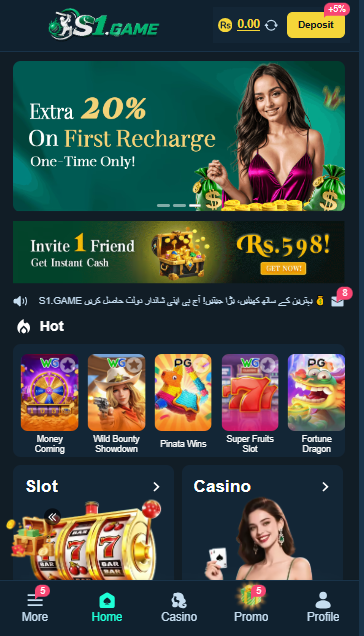
Confirm the Official Source First
Compare the link you received with the address shown on the publisher’s own pages. If the two do not match, stop and investigate before downloading anything.
S1 Game App Details at a Glance
Use the table below as a checklist while you review the download page. Missing information deserves attention before you install.
| Detail | What to Check |
|---|---|
| Platform name | Matches the official website |
| APK version | v1.3.0 |
| Download size | 15.7 MB |
| Minimum Android version | 5+ |
| Developer identity | Identity business or publisher |
| Last release date | New 2026 |
| Game categories | Visible in the current catalogue |
| Payment options | Listed in the cashier section |
| Support channels | Published contact details |
| License or authorization | Stated with a verifiable reference |
How to Check the S1 Game Website
A trustworthy website explains who operates the service. Look for a business name, contact information, a privacy policy, and terms of use. If these pages are missing or vague, that absence is itself a warning sign.
Next, examine where the download button leads. If it opens a different domain, find out why. A change of address needs a clear explanation.
Read the support page too. Can you ask about account access or withdrawal conditions before you register? A helpful response gives you information you can assess. However, a good reply alone does not prove that every other claim is accurate.
Questions to Ask Before Registering
Keep your first questions specific:
- Who publishes and maintains the Android app?
- Where can I read the current terms?
- What information does registration require?
- How does account recovery work?
- Where are payment limits and fees explained?
If the answers stay vague, pause your decision. You should never need to deposit money just to learn how a service works.
S1 Game Features and Navigation Worth Checking
A long feature list can sound impressive. In practice, everyday usability depends on a few basics: readable menus, clear rules, reliable account access, and understandable balances. Assess those first, then decide whether the entertainment suits you.
Layout and Menu Clarity
Check whether you can find the game lobby, profile settings, help section, and transaction history without hunting. Important information should stay readable on a small screen.
Also notice how the app presents paid actions. The amount involved should appear clearly before you confirm anything. Good navigation helps you understand every choice you make.
Rules and Game Categories
Review the actual catalogue rather than relying on screenshots from other websites. Availability can differ between app versions and accounts.
Before entering any game, read its rules and payment conditions. If stakes are involved, confirm the amount at risk and how results are settled. Skip any option you cannot explain in your own words.
Account Registration and Privacy
Before creating an account, read how the platform collects and uses personal information. A registration form should explain each required field.
Choose a unique password. In addition, check whether the service offers account verification or other protection settings. These extra layers make a real difference if someone tries to access your account.
If the platform asks for identity documents, ask who receives them and how they are stored. Never send documents through an unexplained personal chat.
Finally, save the published support details. They give you a reference point if you later face a login problem.
S1 Game Payment Methods and Withdrawal Checks
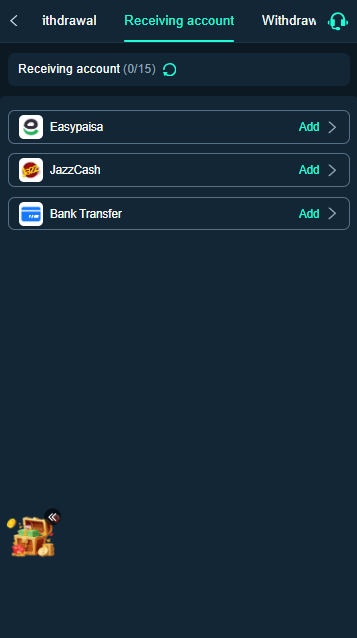
For users in Pakistan, local payment options can make an app more convenient. However, support for Easypaisa, JazzCash, or any other wallet should be confirmed directly in the cashier, not assumed.
Check each payment method against the following points:
| Payment Check | What to Look For |
|---|---|
| Minimum amount | Separate deposit and withdrawal limits |
| Fees | Charges stated clearly before you confirm |
| Account ownership | Any name-matching requirement |
| Processing time | Published schedules and conditions |
| Verification | Checks required before withdrawal |
| Support | A clear route for payment questions |
Easypaisa and JazzCash Checks
If either wallet appears in the cashier, read its deposit and withdrawal instructions separately. You can also review the official guidance on the Easypaisa website and the JazzCash website to understand standard wallet limits and safety tips.
Never share your wallet PIN or one-time password with anyone offering payment help. Legitimate support teams do not ask for these details.
Reading S1 Game Bonus Terms Before You Accept
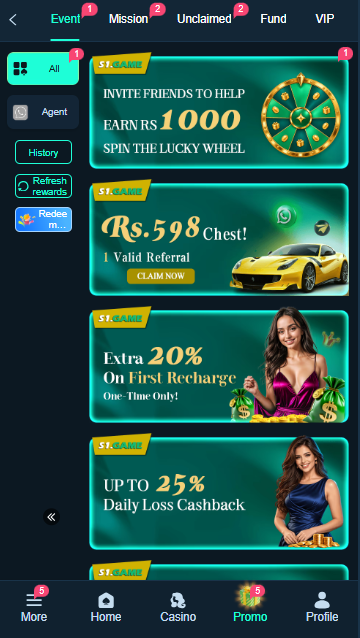
A welcome offer can look attractive, especially when the headline amount is large. Yet the headline rarely explains the full conditions.
First, identify what the reward actually represents. It could be restricted credit, points, or a balance subject to further requirements. Then check these details:
- Does the offer require a deposit?
- When does the reward expire?
- Which games count toward its conditions?
- Are there limits on withdrawals?
- Does accepting it affect your existing balance?
The same approach applies to daily rewards, referrals, VIP benefits, and seasonal promotions. Accept an offer only after you understand its terms. A bonus should never pressure you into spending more than you planned.
Safe Habits Before You Install the S1 Game APK
Installing an APK carries risk, so follow a careful routine:
- Review the file details, including the version number, release date, and compatibility information.
- Check available storage, leaving enough room for installation and updates.
- Download only from an identified source. Avoid links shared through unknown messages or comments.
- Enable installation from your browser or file manager only when needed, then disable it afterward.
- Read each permission request and ask whether it fits the app’s purpose.
- Keep your phone’s security protections turned on throughout the process.
If money is involved, set your spending and time limits before you begin. After a loss, take a break rather than increasing your stake to recover it. Also remember that online gambling is restricted under Pakistani law, so confirm the legal position before you participate. You can read more about responsible gaming on the Google Safety Center, which offers practical advice for protecting your device and account.
Final Thoughts
The best way to assess S1 Game is to examine its information before its promises. Clear ownership, understandable rules, sensible permissions, and detailed payment terms give you a stronger basis for deciding.
Local wallet convenience and attractive bonuses may matter later. First, establish what the app offers and which conditions apply. If essential details remain missing, wait for clearer answers before you download or deposit money.
S1 Game FAQs
Its safety has not been established in this review. Check the publisher, download source, permissions, and privacy terms before you decide to install it.
No current version has been verified here. Look for a dated release record, then compare it with the version shown inside the installed app.
That remains unconfirmed. Check the cashier for supported methods, then review withdrawal limits, fees, verification requirements, and the published processing policy.
No verified basis exists for that claim. If the platform offers paid games of chance, losing money is possible regardless of promotional wording.
Download links
How to install S1 Game Review: What to Check Before You Download APK?
1. Tap the downloaded S1 Game Review: What to Check Before You Download APK file.
2. Touch install.
3. Follow the steps on the screen.