
EP555.COM Game Best Review, Deposit and Withdraw Guide

Description
Mobile gaming platforms appear almost every week, and it is hard to know which ones deserve your time. The EP555.COM Game is one name that many Android users in Pakistan are now searching for.
In this review, you will learn what the platform is, how sign-up works, and how to install the app. You will also read how deposits and withdrawals usually work, plus clear safety advice. Take your time and decide for yourself.
A Quick Overview of the EP555.COM Game
The EP555.COM Game is an online gaming platform that people open through a website or a mobile app. It is designed for phone users, so most pages are built for small screens.
Think of it as one place where you create a single account and then explore the available game options. You do not need a separate app for every game.
Details can change from time to time. Always check the latest information on the official page before the app is easy to use you take any step.Also try this one XP786 OR PAK67 & UP786 Game.
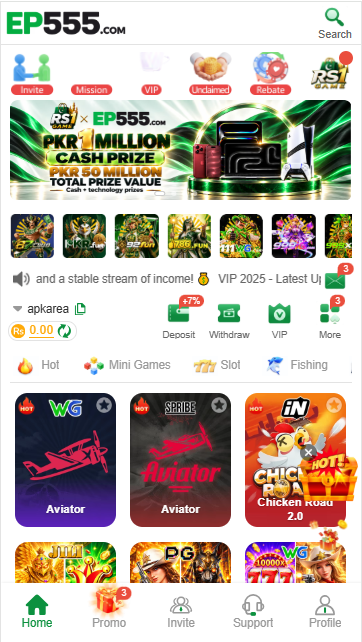
Main Features at a Glance
The table below shows what users usually expect from a platform like this.
| Area | What to Look For |
|---|---|
| App design | Clean menus and fast loading |
| Account | Simple sign-up and secure login |
| Games | Different game styles in one place |
| Wallet | Clear balance and history page |
| Help | Working customer support channel |
Confirm every item inside the app yourself. A short test of the menu and support options tells you a lot.
Mobile-First Design
The layout is made for phones. Buttons are easy to reach, and text is readable on smaller displays. This helps beginners who do not want complicated screens.
One Account for Everything
A single account saves time. You log in once and move between sections without repeating the process. Keep your login details private, because the account belongs only to you.
Step-by-Step: How to Create an EP555 Account E555.COM
Registration is normally short. Here is the usual process:
- Open the official EP555.COM page on your phone browser.
- Tap the register or sign-up button.
- Enter the required details, such as your mobile number.
- Create a strong password that mixes letters and numbers.
- Verify your account if the page asks you to.
- Log in and look around before doing anything else.
Do not rush. Read each screen carefully, and never enter your details on a page you do not trust.
How to Install the EP555 APK on Android E555.COM
Many Android users search for the EP555 APK download. Because APK files come from outside the Play Store, extra care is needed.
- Visit only the official website.
- Tap the download button for the Android app.
- When your phone asks, allow the installation for your browser.
- Open the downloaded file and install it.
- After installation, switch off the unknown-source permission again.
Google explains how app scanning works in its Google Play Protect guidance. Keep that protection turned on.
E555.COM Deposit and Withdraw Guide
Money handling is the most sensitive part of any platform. Payment methods, limits, and processing times can differ and can change at any time. Always read the exact details inside the app before you send or request any money.
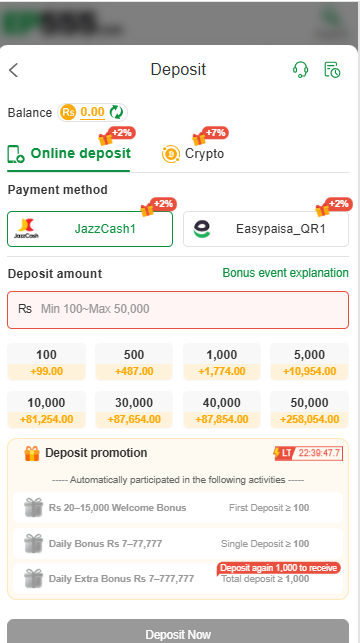
How to Make a Deposit
Deposits normally follow a simple path:
- Log in to your account.
- Open the wallet or deposit page.
- Choose one of the payment methods shown in the app.
- Enter the amount you want to add.
- Follow the on-screen instructions and confirm.
- Check that the balance and transaction record update correctly.
Start with a small amount the first time. This lets you test how the process works without risking much.
How to Withdraw Your Balance
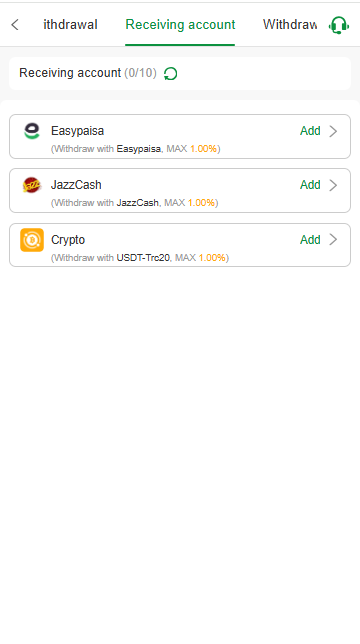
Withdrawals usually work like this:
- Open the withdraw section in your wallet.
- Select a withdrawal method from the available options.
- Enter the account details carefully and double-check them.
- Type the amount and submit the request.
- Wait for the processing time shown in the app.
Account verification may be needed before the app is easy to use a withdrawal. Complete it early so you do not face delays later.
Money Safety Tips
- Use only the payment options displayed inside the official app.
- Never send money to a personal account because someone messaged you.
- Keep screenshots of every deposit and withdrawal.
- Read the rules about limits and processing time first.
- Contact support through the app if a payment looks stuck.
Is the EP555.COM Game Safe? Check These Points
No article can promise safety, so use this checklist yourself.
- Official source: Download only from the official website.
- Terms and conditions: Read them before you add any money.
- Strong password: Use a unique one that you do not use elsewhere.
- No sharing: Never share OTP codes, passwords, or ID details.
- Permissions: Deny app permissions that look unnecessary.
If something feels wrong, stop and think. It is better to leave than to take a risk.
Responsible Play Matters of E555.COM
Games that involve real money can be risky. Some people enjoy them as entertainment, but others lose control. Ask yourself a few honest questions before the app is easy to use you begin.
- Can I afford to lose this money?
- Is this activity legal where I live?
- Am I playing for fun, or trying to solve a money problem?
Set a limit and stick to it. Never borrow money to play. If you feel stress or pressure, take a long break. Free advice is available from organizations such as BeGambleAware, which helps people stay in control.
Tips for Beginners
- Start slowly and learn how each section works.
- Decide on a small budget first.
- Do not chase losses.
- Update the app only from the official source.
- Use a screen lock and keep your phone safe.
Good habits matter more than any lucky moment.
Pros and Cons
| Pros | Cons |
|---|---|
| Easy for phone users | Information may change over time |
| One account for several options | You must verify safety yourself |
| Simple registration steps | Withdrawals may need verification |
| Lightweight app experience | Money-related risk exists |
Final Thoughts E555.COM
The EP555.COM Game offers a simple, phone-friendly way to explore online games under one account. Registration is easy, and the app is built for beginners.
Still, a good decision needs careful checking. Download from the official source, understand the deposit and withdraw rules, and play with a clear budget. Read the latest details and choose what is right for you.
Frequently Asked Questions (FAQs) E555.COM
It is an online gaming platform that users reach through a website or Android app. It places several game options under one account.
Open the official website, tap the Android download button, and install the file on your phone. Avoid links sent by strangers.
Open the wallet section, choose a payment method shown in the app, enter the amount, and confirm. Start with a small test amount.
Processing time can vary. Check the time stated inside the app, and contact support if your request is delayed.
Pending requests may happen because of verification checks or processing queues. Confirm your account details and ask support for help.
Use a strong password, avoid public Wi-Fi for logins, and never share OTP codes with anyone.
Download links
How to install EP555.COM Game Best Review, Deposit and Withdraw Guide APK?
1. Tap the downloaded EP555.COM Game Best Review, Deposit and Withdraw Guide APK file.
2. Touch install.
3. Follow the steps on the screen.